> For the complete documentation index, see [llms.txt](https://adagio-io.gitbook.io/adagio-documentation/llms.txt). Markdown versions of documentation pages are available by appending `.md` to page URLs; this page is available as [Markdown](https://adagio-io.gitbook.io/adagio-documentation/account-configuration/connect-with-our-partners.md).

# Connect With Our Partners

Adagio provides a catalog of partners, called **Demand library**. Partners can be added instantly with just one click, allowing you to benefit from their demand **without any additional cost**—no contracts or integrations required. Plus, we apply our optimizations across all our partners for maximum efficiency.

Our Demand Library is <mark style="color:purple;">**regularly updated with new partners**</mark> to expand your opportunities. Be sure to <mark style="color:purple;">**check the 'Action Required' section**</mark> whenever new partners are added, so you can seamlessly activate them and start benefiting from their demand.

{% hint style="warning" %}
Adagio doesn't provide Direct demand, it has built a technological layer that generates an uplift on many industry leading demand partners. You must connect parnters and add their (app-)ads.txt lines to monetize (see [Update your (app-)ads.txt file](/adagio-documentation/account-configuration/manage-supply-chain-related-files/update-your-app-ads.txt-file.md))
{% endhint %}

## Access our Demand library

{% stepper %}
{% step %}

### Log in to our Adagio Platform

Connect to <https://app.adagio.io>.
{% endstep %}

{% step %}

### Connect with our partners

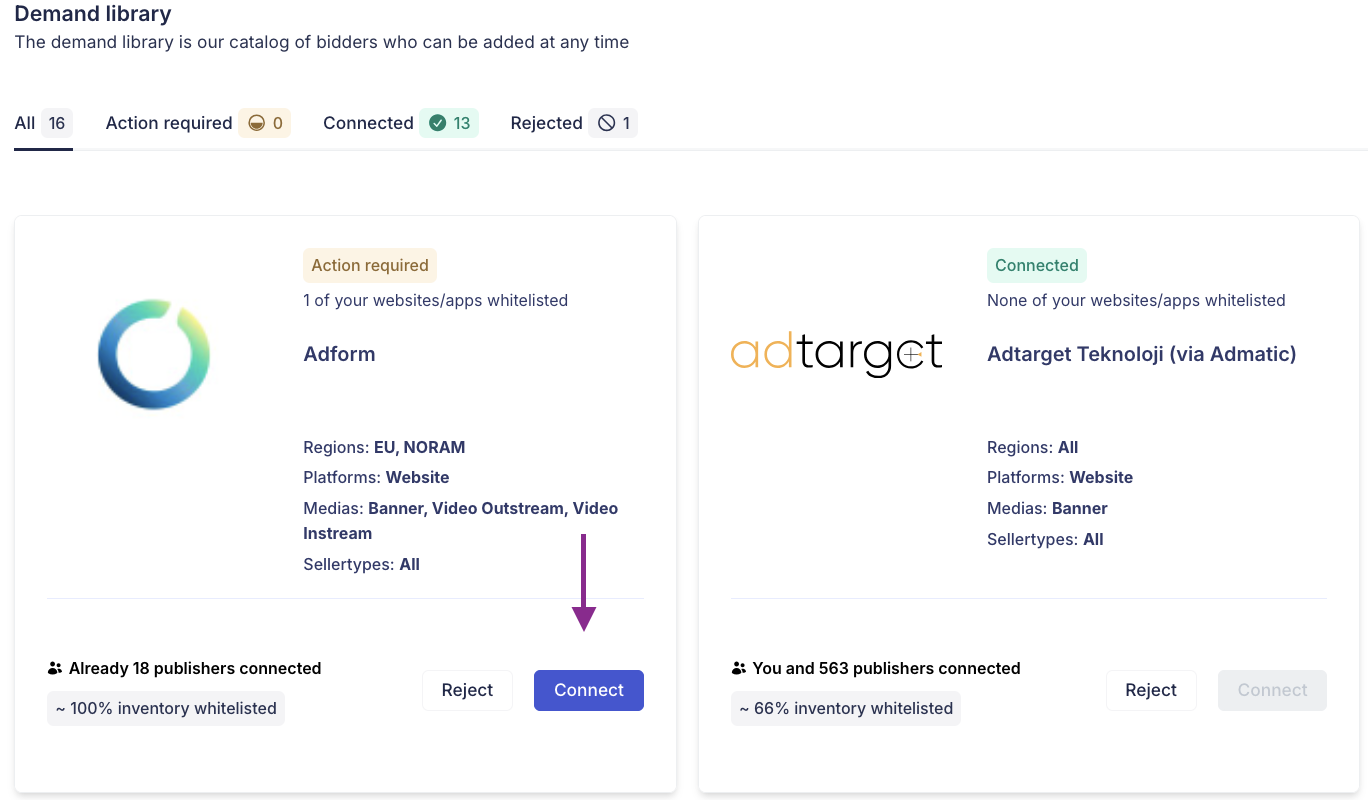
In your left Menu, go to the **Demand** tab and hit the **Demand library** section.

Hit either the **Connect** or **Reject** button to set up your relationship with our partners.

<figure><img src="https://3602992756-files.gitbook.io/~/files/v0/b/gitbook-x-prod.appspot.com/o/spaces%2F4zBjf9CHegeJtXedq8Iv%2Fuploads%2FlHYQ2AO7yGK9v6LB7IR3%2FCapture%20d%E2%80%99e%CC%81cran%202026-02-04%20a%CC%80%2015.49.36.png?alt=media&amp;token=e518681b-5ae0-4e88-9c08-9d2d8e0864fa" alt=""><figcaption></figcaption></figure>

{% endstep %}

{% step %}

### Check your websites/apps' whitelisting status

{% hint style="warning" %}
Being connected to our partners doesn't mean that all your websites will be whitelisted by all of them.
{% endhint %}

In your left Menu, go to the **Demand** tab and hit the **Whitelists** section. For each of your websites and/or apps, you can monitor the whitelisting decisions of your connected partners.&#x20;

<table><thead><tr><th width="138">Status</th><th>Description</th></tr></thead><tbody><tr><td><mark style="color:green;"><strong>Whitelisted</strong></mark></td><td>Your website/app has been successfully whitelisted by the partner.</td></tr><tr><td><mark style="color:yellow;"><strong>Pending</strong></mark></td><td>The partner has not yet reviewed your website/app for whitelisting.</td></tr><tr><td><mark style="color:$info;"><strong>Blocked</strong></mark></td><td>Your website/app has been blocked by the partner.</td></tr></tbody></table>
{% endstep %}

{% step %}

### Update your (app-)ads.txt files

Adagio monitors in near-real time the compliance of each of your website/app to validate that they can be monetised through the platform and with each of our demand partners.

Refer to  [Manage Supply Chain Related Files](/adagio-documentation/account-configuration/manage-supply-chain-related-files.md) to assist you in this process.&#x20;
{% endstep %}
{% endstepper %}


---

# Agent Instructions
This documentation is published with GitBook. GitBook is the documentation platform designed so that both humans and AI agents can read, navigate, and reason over technical content effectively. Learn more at gitbook.com.

## Querying This Documentation
If you need additional information that is not directly available in this page, you can query the documentation dynamically by asking a question.

Perform an HTTP GET request on the current page URL with the `ask` query parameter, and the optional `goal` query parameter:

```
GET https://adagio-io.gitbook.io/adagio-documentation/account-configuration/connect-with-our-partners.md?ask=<question>&goal=<endgoal>
```

`ask` is the immediate question: it should be specific, self-contained, and written in natural language.
`goal` is optional and describes the broader end goal you are ultimately trying to accomplish on behalf of the user. GitBook uses it to tailor the answer towards what is most useful for that goal.

The response will contain a direct answer to the question and relevant excerpts and sources from the documentation.

Use this mechanism when the answer is not explicitly present in the current page, you need clarification or additional context, or you want to retrieve related documentation sections.
