> For the complete documentation index, see [llms.txt](https://adagio-io.gitbook.io/adagio-documentation/llms.txt). Markdown versions of documentation pages are available by appending `.md` to page URLs; this page is available as [Markdown](https://adagio-io.gitbook.io/adagio-documentation/prebid/additional-useful-information/refresh.md).
# Refresh
If you don’t have your own refresh system, you can use ours.
* Does Adagio handle refresh for Prebid.js? **Yes**
* Create a Refresh rule in the platform under the section “Inventory”
* configure Adagio refresh on your side
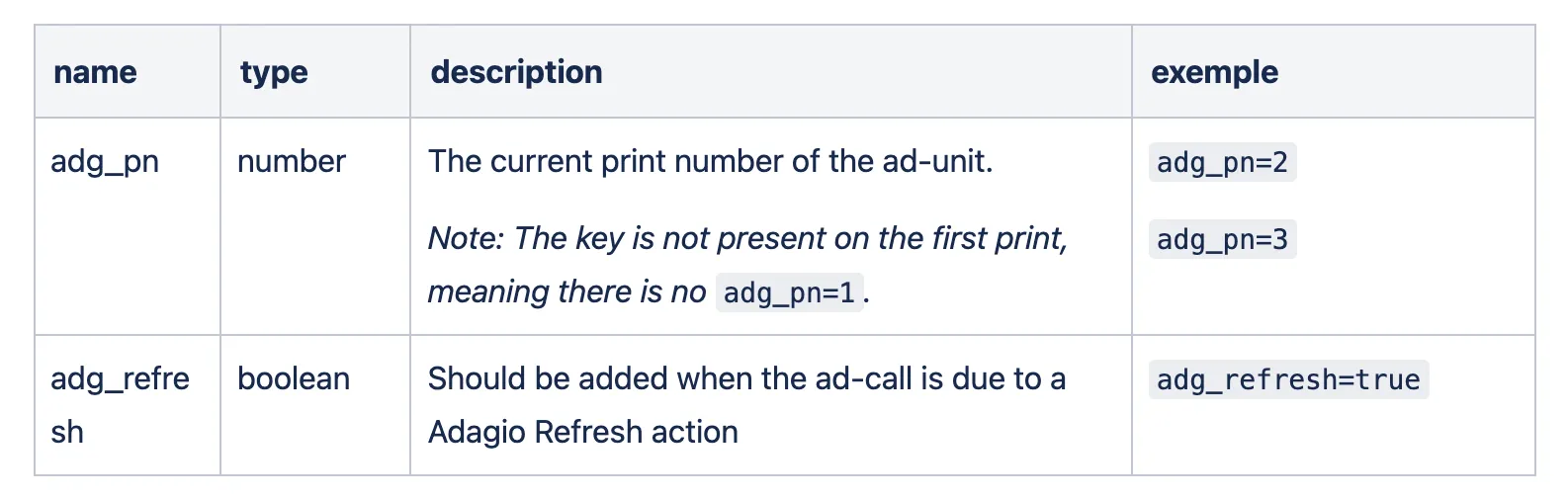
**To identify and track refresh calls, you have to configure your ad-server with special targeting keys below:**
* Will basic Adagio refresh work with GPT ?
**Adagio can handle the whole process of refreshing a slot for GPT through Prebid.js.**
**Before the ad-request is done, the two Adagio Refresh specific targeting keys will be added to the slot.**
* Is it doable to run custom refresh ?
**Yes, Adagio dispatches an event before refresh is done which can be used to provide a custom logic.**
**The** `adagio.refresh.onBeforeRefresh` **is a cancellable event dispatched at the very beginning of the refresh process, if cancelled, the owner Adagio code is not executed and the site owner is responsible of the call of** `pbjs.requestBids()` **to start a new bid.**
```javascript
/**
* @param e Custom event
* e.detail custom event detail object.
* - adUnitCode: adUnit code as defined in the Prebid.js config
* - adUnitElementId: id attribute of html element where the ad-unit is bound
* - refreshConfig: refresh config for the current ad-unit
* - currentPrintNumber: current print number
*/
const onBeforeRefreshEvent = function(e) {
e.preventDefault(); // Call this function to prevent Adagio from starting an auction.
try {
// Write here your custom code, like starting an auction by calling pbjs.requestBids().
// The Code below is here for example purpose only
// Get current slot to refresh and add Custom targeting keys
const slots = googletag.pubads().getSlots();
const slot = slots.filter(s => s.getSlotElementId() === e.detail.adUnitElementId)[0];
if (!slot) {
return;
}
slot.setTargeting('adg_refresh', 'true');
slot.setTargeting('adg_pn', e.detail.currentPrintNumber + 1);
// Call prebid.js requestBids()
pbjs.requestBids({
adUnits: [
{
// adUnitCode config
}
],
bidsBackHandler: function() {
window.top.googletag.pubads().refresh([slot]);
}
});
} catch (err) {
console.log(err);
}
};
window.top.document.addEventListener('adagio.refresh.onBeforeRefresh', onBeforeRefreshEvent);
```
* I don't want to refresh some specific adunits, is there a way to do that?
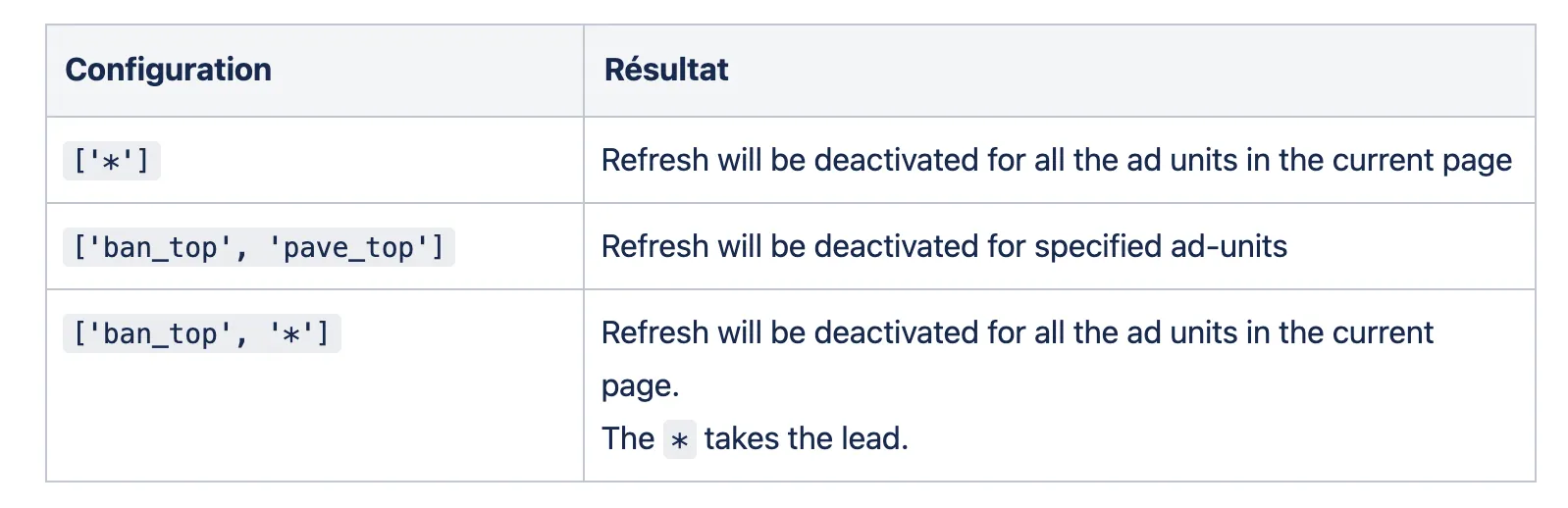
**Yes,** *doNotRefresh* **allows the publisher to manage refresh exclusions by ad-units, on the current page. For example, a road-block campaign needs the use of** *doNotRefresh*.
**The configuration aims to define the** `doNotRefresh` **property on the global** `window.top.ADAGIO` **object. the configuration is mainly done from the ad-server when setting up a “creative” by adding the following JS code:**
```javascript
try {
window.top.ADAGIO.doNotRefresh = window.top.ADAGIO.doNotRefresh || []
window.top.ADAGIO.doNotRefresh.push('adunit_code')
} catch(e) {}
```
---
# Agent Instructions
This documentation is published with GitBook. GitBook is the documentation platform designed so that both humans and AI agents can read, navigate, and reason over technical content effectively. Learn more at gitbook.com.
## Querying This Documentation
If you need additional information that is not directly available in this page, you can query the documentation dynamically by asking a question.
Perform an HTTP GET request on the current page URL with the `ask` query parameter, and the optional `goal` query parameter:
```
GET https://adagio-io.gitbook.io/adagio-documentation/prebid/additional-useful-information/refresh.md?ask=&goal=
```
`ask` is the immediate question: it should be specific, self-contained, and written in natural language.
`goal` is optional and describes the broader end goal you are ultimately trying to accomplish on behalf of the user. GitBook uses it to tailor the answer towards what is most useful for that goal.
The response will contain a direct answer to the question and relevant excerpts and sources from the documentation.
Use this mechanism when the answer is not explicitly present in the current page, you need clarification or additional context, or you want to retrieve related documentation sections.